


Most PMs treat infrastructure costs as an engineering problem. By the time the bill arrives, every expensive decision is already baked into the architecture and the margin is gone.
I learned this building the Prompt-Led Product Vault. I had a choice: ship it fast with LLM calls powering every search and query, or build it constraint-driven where every operation had to justify its cost before it shipped.
I chose the second path. Today the Vault serves 71 paid users on Supabase’s free tier with a $0 monthly hosting bill.
I treated that constraint as a product decision I made once and never revisited.
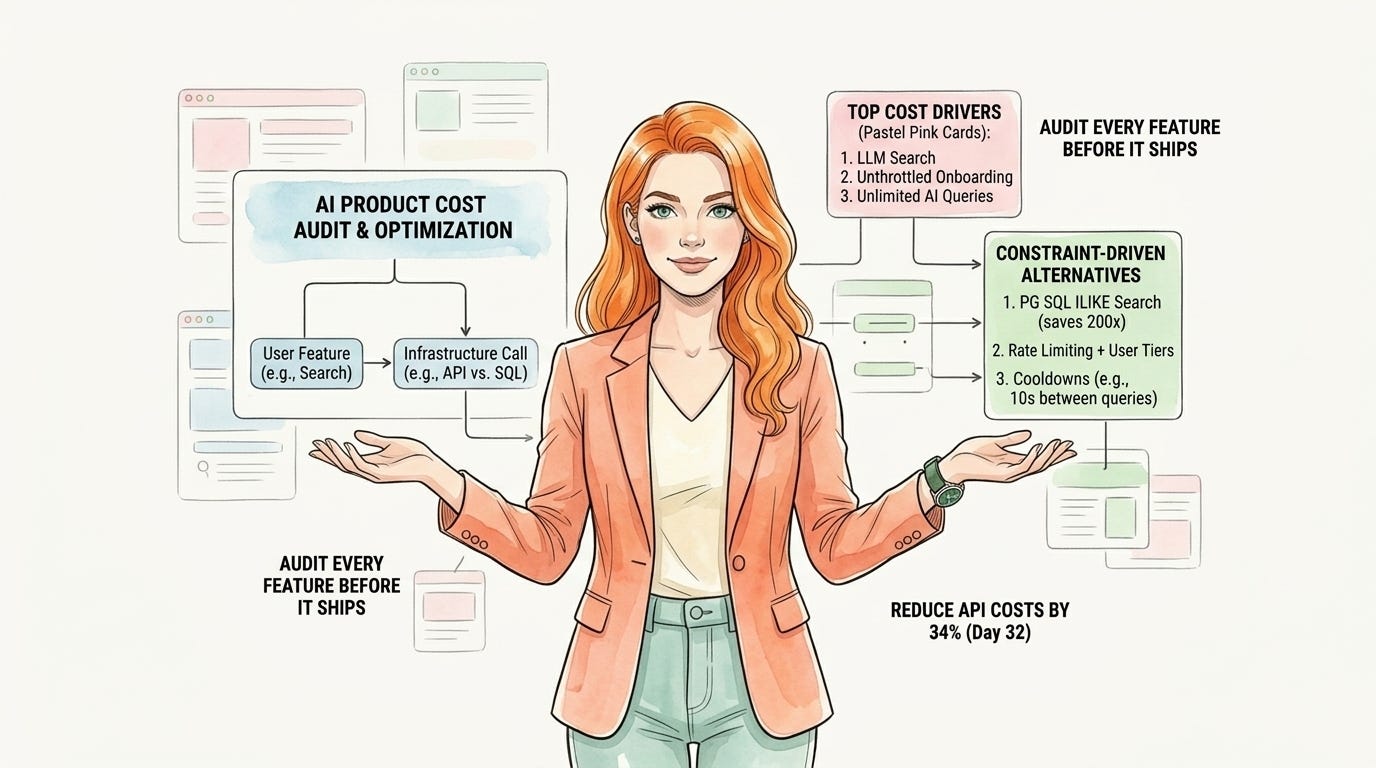
Most builders add features without mapping what each feature costs at the infrastructure layer. A search bar backed by an LLM call costs roughly 200 times more than the same search bar backed by a PostgreSQL ILIKE query.
The user feels no difference. Your infrastructure bill does.
The moment you treat infrastructure constraints as product requirements, you start making different decisions. Rate limits become access tiers. Cooldowns become quality gates that improve user intent. SQL replaces API calls everywhere the output is deterministic.
Constraint-Driven Design Is a Margin Decision, Not a Tech Decision
The builders scaling expensive infrastructure from day one are betting that growth will eventually justify the bill. That bet fails constantly.
The builders who engineer constraints from the start build products that become more profitable as they grow, because the cost structure was decided at the architecture level, not at the billing page.
A product that costs $0 to serve 71 users costs roughly $0 to serve 200. That math is the moat.
The prompt below is what I use to audit any AI product’s cost structure before a single expensive decision gets locked in.
Why This Prompt Works: Cost Accounting at the Feature Level
Most teams look at their cloud bill and see a total. This prompt forces you to look at each user-facing feature and trace it back to the infrastructure call it triggers.
Once you can see “this search bar triggers an OpenAI call every time” versus “this search bar runs a SQL query every time,” the decision is obvious. The prompt’s second move is equally important: it asks for a constraint-driven alternative for every expensive operation, not just a cost reduction.
That reframe changes the output from “spend less” to “build it differently.”
I covered the same pattern in The Dark Side of AI Prototyping: rapid shipping creates expensive architecture by default unless you bake the constraint in from the start.
The Prompt
Role: AI Profitability Architect.

Context: I am auditing an AI product that is suffering from high
infrastructure costs relative to its revenue. The goal is to
identify architectural changes that will dramatically reduce costs
without degrading core user value.

Task:
1. Analyze the user-facing features and map them to their underlying
   infrastructure calls (database, AI APIs, storage).
2. Identify the Top 3 cost-driving operations.
3. Propose a "Constraint-Driven" alternative for each, using
   rate-limiting, cooldowns, or pure SQL instead of expensive API calls.

Input: [Insert Product Architecture Documentation and a recent
Infrastructure Bill].
How to Run It
Paste this into Claude or Cursor with your current architecture doc and a screenshot or export of your last infrastructure bill. If you don’t have an architecture doc, describe your product’s main user flows in plain English and list your stack. The output gives you three concrete swaps ranked by cost impact.
Run this before you add any new feature. Five minutes mapping a feature to its infrastructure cost will save you months of refactoring later.
The three moves that came out of my own audit on the Vault:
✅ Rate limits calibrated to user tiers (free, monthly, lifetime) to stay within Supabase’s free-tier connection limits
✅ A 10-second cooldown between queries that reduced server load and improved user intent simultaneously
✅ Core search running on PostgreSQL ILIKE instead of an LLM API call, covered in detail in Build Series Part 5
Find More Prompts Like This
This prompt is part of the Prompt-Led Product Vault, a growing library of battle-tested prompts I use when building AI products, auditing existing ones, and leading technical PM decisions.
Every prompt in the Vault comes with useful examples, the logic behind the structure, and a real usage example.
The 34% That Nobody Noticed Was Gone
Running this audit on a client’s product last quarter surfaced a single LLM call buried inside an onboarding flow that was firing on every page refresh. Removing it cut their API bill by 34% in the first month.
The users never noticed it was gone. The savings showed up on day 32.
That gap between invisible to users and visible on the P&L is where profitable products live. Most builders never find it because they look at the billing page after the architecture is already locked, not before.
If you want me to run this audit on your product’s architecture before your next build cycle, reach out at hello@elenacalvillo.com.
A search bar should find the answer before it finds a second business model for your cloud provider.